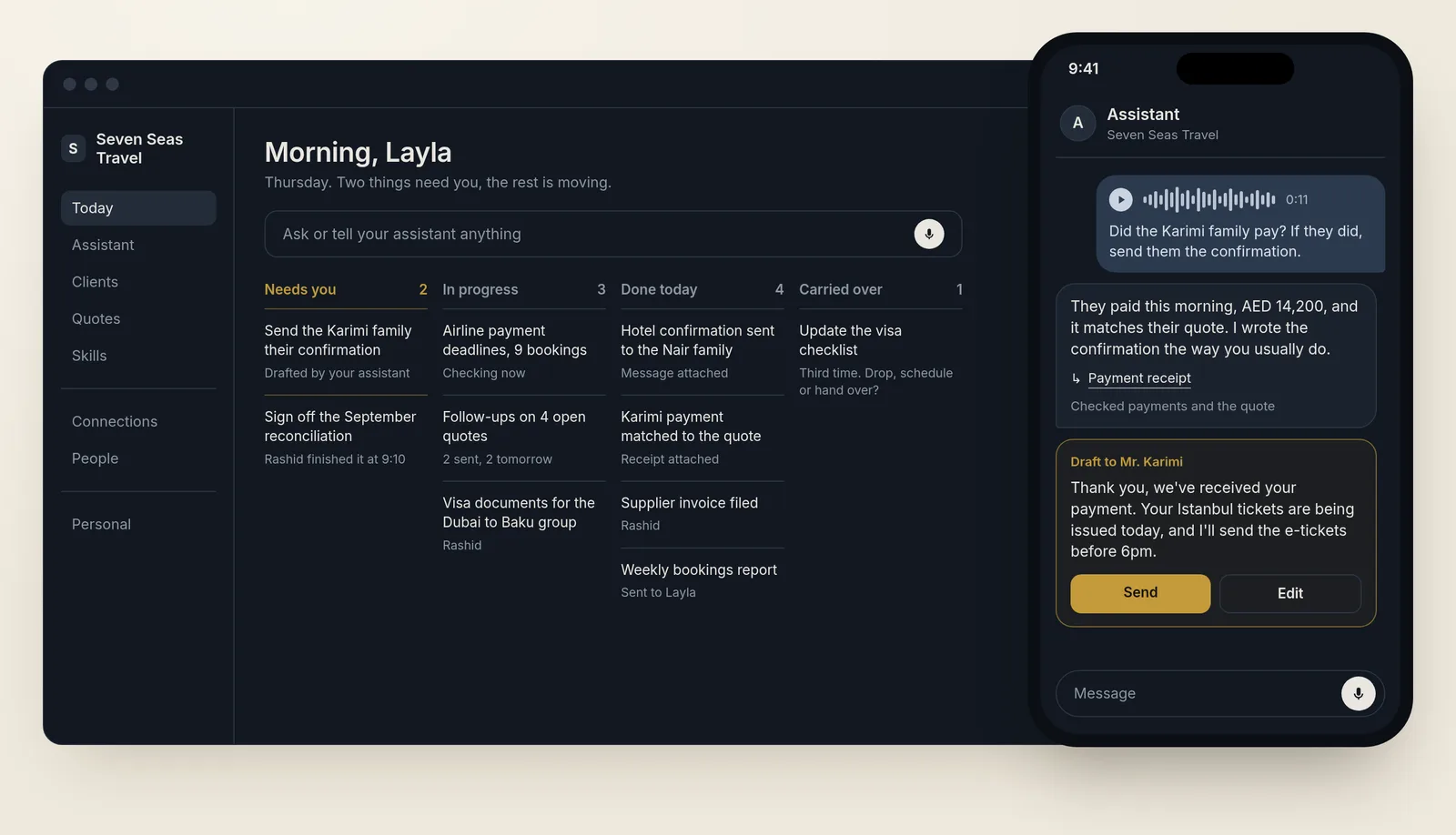
RalvetoOS is an AI operating system with two sides. Work is your business: the owner, the team, the clients and the AI agents working off the same records. Personal is you and your own agents, with a space of your own. Same app, one tap apart.
You sign up, tell it about your business the way you'd brief a new manager on their first day, plug in the tools you already use, and from then on everyone on your team has their own assistant they can throw anything at, by voice or by chat.
HarsOS is the AI operating system I built for myself. I wrote up how it works in HarsOS explained. My agents know my clients, my projects, my decisions and how I like things done. I send a voice note from my phone and the work gets done. RalvetoOS is that, built so a whole business can run on it, with whatever AI each person already uses plugged straight in.
You don't need to call me to start. You sign up, log in and use it, the same way you'd start with any software. If you'd rather have someone set it up for you, my agency Ralveto does that as an add-on. The product is the thing you sign up for.
Here's how it works and why every piece exists.
A few terms first
If you've read HarsOS explained, you already know what a model, a harness and an agent are. RalvetoOS adds a few more.
An assistant is an AI agent that works for one person. In RalvetoOS everyone gets one: the owner, each member of staff, and anyone using it for their own life.
A company agent works for a department instead of a person. A Sales agent or a Marketing agent holds that department's playbooks and acts on the department's behalf.
A skill is a written playbook for one kind of job: how to write a proposal, how to chase an invoice, how to close the month. An agent loads the right skill when the job in front of it needs one.
A connector is what lets RalvetoOS read and work inside another app, like your email, your CRM or your accounting software.
MCP, short for Model Context Protocol, is a standard way for an AI app to plug into another system's tools and data. ChatGPT, Claude and Copilot all speak it. It's how your own AI plugs into RalvetoOS.
Why I'm building it
Most businesses buy AI the same way. Someone pays for ChatGPT, it sits in a browser tab, and it knows nothing about the business. Every time anyone uses it, they start by pasting in the context: who the client is, what was quoted last time, what the boss said on Tuesday.
The tools a team actually works in don't solve it either. Slack and Teams are where the conversations happen, and they're heavy: channels, apps and settings before anyone gets anything done. ChatGPT is simple to talk to, but it ties you to one company's models, and your business doesn't live inside it. I'm building the thing in between: as easy to talk to as ChatGPT, as organised as a team chat, with any AI you like plugged in.
The other option on the market is custom work, one build per client. I sell custom work myself through Ralveto, so I know exactly where it helps and where a business ends up waiting on someone like me.
And then there's the bot problem. The new AI products keep adding more of them, each with its own name and its own chat. I tried that on myself. At one point I ran eleven agents. Today I run three. Most business owners here don't want to work out which bot to ask. They want things done.
So RalvetoOS is built around a few simple ideas. Every person gets their own assistant. Your own AI plugs in, and RalvetoOS plugs into yours. Tools show up when you ask for them. Your existing tools stay. And you can take everything with you.
Sign up, then talk
It starts at a sign-up page, like any software: Google, Microsoft or a work email. The first question is whether this is for a business or just for you. You can have both.
Then you hand it the basics: your name, your website, your email. While it reads your site and connects your tools, it asks you to tell it more. You can type, but most people here will send a voice note, in English or Gulf Arabic, the same way they'd brief a new manager.
Say you run a travel agency with six people. You talk for two minutes: quotes go out from Outlook, customers follow up on WhatsApp, the airline payment deadlines are what keeps you up at night, and Rashid does the reconciliation. As you talk, it shows what it's finding, like the number of open quotes in your inbox and the customers it recognises, and it underlines what it picked up from you: the six people, Outlook, the deadlines, Rashid. You never sit and stare at a loading bar.
Then comes the read-back. "Here's what I understood." One fact per row, each with its own Change link. Underneath, how it's going to set itself up: who joins, which tools switch on, which skills it starts with. You fix anything that's wrong, tap Looks right, and it builds itself around your answers.
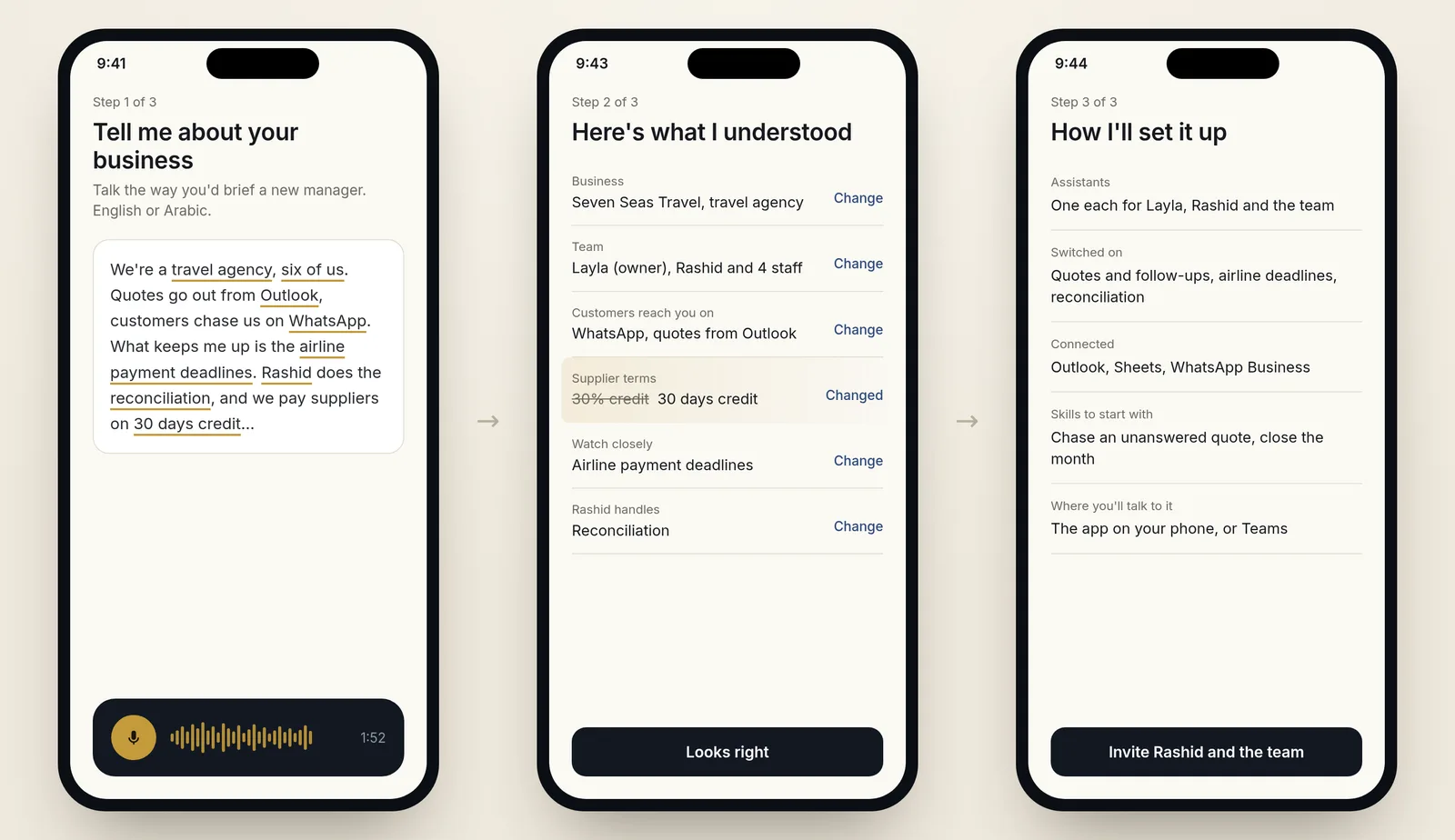
The read-back is there for one reason. An assistant that hears "30 days credit" as "30% credit" and acts on it is worse than no assistant at all. So everything you said comes back to you in plain words before it becomes something the system works from.
Before any tour of the app, it asks what eats your week, takes one real chore off you and does it. Your first finished job comes back with proof attached: the sent email, the updated sheet. Then the tour.
Then you invite your team. Each person gets a much shorter version. The company, its tools and its knowledge are already there, so their assistant only asks what's personal to them: their role, their own chore, their quiet hours. It never asks again for anything the business already told it.
Every person gets their own agent
Everyone gets their own assistant, with its own name, its own memory and its own way of working for you. You throw anything at it: a voice note on the way to a meeting, a screenshot of a supplier's message, a forwarded email, "chase the invoice from last week", "what did we quote this customer last time?"
Each assistant has one main chat that never ends. It's where you talk to it every day. When a job deserves its own space, like a tender, a hire or a product launch, you open a thread for it, with its own files and its own focus. The main chat keeps track of every thread, pulls together what they found and tells you when two of them disagree.
Behind that, skills load when the job needs them, and helpers go off and do the reading: one checks the contract, another pulls last month's numbers. What comes back is the result, with the proof attached. When the assistant has drafted something for you, Send and Edit sit right under it.
A business can also add company agents, one per department. Your Sales agent knows the price list and how quotes go out. Your Marketing agent knows the brand rules. When the know-how lives in the department's agent, it stays with the business when someone leaves.
Every agent has its own identity and memory, and they all work from the same principles the business sets: how you talk to customers, what you never promise, what needs a yes from whom. Different agents, one way of doing things.
And just like a team chat, you can @ any agent in a group conversation. Ask the Sales agent in the projects channel for the latest quote, and it answers there, for everyone in the channel.
The assistant also speaks first, when something is new and actually matters to you. A payment lands, and it tells you that unblocks the order you were holding. A quote has been carried over for the third time, and it asks whether to drop it, schedule it or hand it to someone. What counts as "matters" adapts to you: it learns what you act on and what you ignore. Otherwise it stays quiet.
The Today screen
The assistant is where you get work done. The app is where you see it.
Open RalvetoOS and the first thing you see is Today: Needs you, In progress, Done today and Carried over. Work done by people and work done by agents sit in the same lists, so you see the whole business moving in one place.
Nobody has to open the app to get work done. Everything happens through the assistant, wherever you talk to it. The app is the receipt.
Your AI plugs in, and RalvetoOS plugs into yours
This is the part I care about most. RalvetoOS is agent-native both ways.
Your AI plugs into RalvetoOS. Already paying for ChatGPT, Claude or Copilot? Use it. Every business gets its own MCP server, a command line and an API, so you can open Claude, or Copilot inside Teams, and work on your business from there: ask what's overdue, draft the proposal, update the client. The same goes for OpenAI's Dots, Hermes, Cursor, Codex, or a script your developer wrote. You stop pasting context into a browser tab, because the browser tab now has the context.
RalvetoOS plugs into your stuff. Your tools, through connectors. Your own models, on your own keys or on the AI plan you already pay for, so you pick the model for each job. Your own agents, as workers RalvetoOS can hand jobs to.
No model and no vendor is baked in. When a better model ships next month, from any lab, you switch, and your agents keep their memory, their skills and their history. Every AI lab wants to be the app you open in the morning. Whatever app a business already lives in, RalvetoOS works from there, and what sits behind it stays the business's own.
Your tools stay
A lot of businesses don't want to move anything. Fair. RalvetoOS gives you three ways in, and you pick per tool:
- Connect. Agents work inside the tool you already use. Your HubSpot stays your HubSpot.
- Mirror. Its records show up inside RalvetoOS, so the CRM screen, the boards and search all work in one place, while the original tool stays the main copy.
- Built in. When you're ready, RalvetoOS has its own version, built for you.
Some things should stay outside for good: your accounting ledger, your e-invoicing provider, your email. RalvetoOS prepares the work inside first, the invoice details, the proposal, the reply, and the outside tool handles the final moment: send, pay, file.
Tools show up when you ask
RalvetoOS doesn't open with forty menus. You start with your assistant and the Today screen. Everything else appears when you need it.
Need a CRM? Type "add a CRM" and it shows up, already filled in from the emails and invoices the system has seen, or connected to the CRM you already pay for. The same goes for a projects board, a calendar, proposals, invoices, reports, or a hiring pipeline. The menu only ever shows what your business actually uses.
I call it just in time: the system is built from small pieces, and each one appears when the work in front of you needs it. Skills work the same way. They load when the job needs them and stay out of the way otherwise.
It also comes with ready-made workflows for the jobs most businesses here share: following up a quote, chasing a late payment, the morning brief, the month-end checklist. You switch on the ones you need during setup, and each one adapts to how your business already does it.
And routines are plain sentences. "Every Friday at 3pm, send the week's ticket numbers to the implementation channel." It becomes a small card you can see, pause or edit.
Files and knowledge
Every document, sheet, deck and PDF your team and agents make lives in one library, with who made it and where it stands: draft, waiting on someone, sent. Open any file and edit it yourself, or ask an agent to change it.
Underneath sits the business's knowledge: what was decided and why, what was learned, how each job is done. It's built the way I built my own, the system I describe in HarsOS explained, where every fact points back to where it came from. It never pretends to be the main copy of anything that lives in another tool.
A correction becomes a fix
When you correct an agent, it shouldn't make the same mistake next week, and nobody else on the team should have to make the correction again.
So every correction is written down as a lesson. Lessons that keep coming back turn into an improvement to the skill behind the job, and someone on your team signs it off before it changes how everyone works. You can see what changed and why.
The same thing happens across businesses, minus the private parts. When a pattern proves itself, the lesson can make RalvetoOS better for everyone, stripped of names, numbers and anything that identifies who taught it. Your data stays yours. The lesson travels.
A person answers for every agent
Every agent in RalvetoOS has a person it works for, or a department head who owns it. When an agent sends a quote, you can see which agent sent it, for whom, and what it was working from.
This is how I run my own agents. They do the work, and I own what leaves. The more a business trusts its agents, the more it hands them, and it always knows who to ask about any of it.
Built for the people who work there
RalvetoOS is built for the staff as much as the owner.
Everyone gets an assistant that takes the busywork off their plate: the chasing, the copying between systems, the reports nobody likes writing. When someone works out a better way to do a job, it's saved as a skill the whole team can use, with their name on it. The quote that wins, the checklist that saves a day at month-end. The best version of a job becomes the default way it's done, and the person who found it gets the credit.
Client portals
If your business has clients, each one gets a portal.
A portal is one record with two faces. Your team sees the whole client: the deal, the internal notes, the costs, every task. The client sees their side: what needs them, their files, their invoices, what changed since their last visit, and "nothing needed from you" when that's true.
The steps run in order on that one record: proposal, accepted, signed, invoiced, paid. Each one opens the next. An agency can put its own name, logo and domain on every portal.
I've built this already, client by client. One of my portals takes a client from signing the agreement, to paying, to booking the first call, all from one link.
Your personal space
The Personal side is you and your own agents. It's where your reminders, your plans, your admin, your files and the hundred small things you'd otherwise forget live, with the same assistant, the same knowledge, the same routines and the same voice-first way of talking.
You power it with the AI plan you already pay for, or your own keys, and you can bring the agents you already use.
The business sees only what you choose to share with it. If you leave the company, your personal space leaves with you. And you can sign up just for yourself, with no business at all.
Yours to take with you
RalvetoOS works with any model. One click exports everything: your records, your skills, your history and your agents. Backups run on their own, and a backup only counts if you can actually restore from it.
Making it this easy to leave sounds like giving the business away. I explained why it isn't at the end of HarsOS explained, in the part about the moat.
How it opens
RalvetoOS opens as a beta, in phases.
I'm first. I'm moving my own setup onto it: my subscriptions, my agents, my Notion and my other tools, plugged in through the same connectors a customer would use. Then my own agency, Ralveto, runs on it. Then a small group of businesses, and then open sign-up.
Nobody is locked in at any phase. A business stays because it's useful, and if it isn't, it leaves with everything. The desktop app comes first, then the phone.
The same core grows with the business: one owner and one assistant, then twenty staff with their own, then a company with departments. What changes with size is how many people are on it, which tools are switched on, and who sees what. The extra controls a large company's IT team asks for, like single sign-on, come after the beta.
What's already running
RalvetoOS is being assembled from pieces I've already built and use:
- HarsOS, the personal side. I live in it every day, with my own agents, each with its own identity and memory, working from shared principles. How it works.
- A client portal that takes a client from signed agreement, to payment, to booked call from one link, reused for each new client.
- A status app for a client's shop. She talks to her assistant, and the app shows where things stand.
- Personal AI agents for a business owner here in the UAE and his office, one assistant per person.
- Corrections turned into fixes. In my own system, lessons from every day are reviewed and merged into the skills my agents load before they do that job again.
- Harsift, the hiring piece. It turns a job brief into small questions a CV can actually answer, and every shortlist decision points to the exact line in the CV behind it. It's live at harsift.byhars.com.
- The RalvetoOS screens, designed end to end: the business app on desktop and phone, the agent chats, files, apps, knowledge and onboarding.
RalvetoOS puts these together behind one assistant each, for anyone who signs up.
HarsOS and RalvetoOS feed each other
HarsOS is where I test everything on myself first. What works goes into RalvetoOS. The patterns travel from one to the other. My private data never does.
It runs the other way too. What real businesses teach me on RalvetoOS comes back into HarsOS, so the system I live in keeps getting better from work I'd never have seen on my own.
When it's ready, getting a business its own AI should take a sign-up and one voice note.
If you run a business here, tell me the first thing you'd hand it.